Proofreading, part 22

Proofreading a Torah is a tremendous task, requiring much memory and data processing and demanding infallible accuracy. Computers, of course, have much memory and data processing ability, and are notoriously accurate. Having established that computer checking can be part of proofreading, one frequently hears the question “Why can’t the computer do it all?”

I think we’ve mostly answered that, under the heads of human error and technological limitations, but I find the question itself interesting. Why would anyone think the computer could do it all?

A child of my generation, it came as something of a surprise to me to realise that some people genuinely do think of computers as infinitely clever, infinitely powerful (Which kind of makes sense – when “the system” is down, utter helplessness ensues, so one might unconsciously infer that non-helpless states are only possible when the system is up). And if you see a computer as a magical mystery box that can do all sorts of things you couldn’t possibly do, I suppose it makes sense that you would think a computer could do a much better job of checking a Torah than you could, just like it can do a spellcheck better than you can.

Except that of course the computer’s spellchecking ability only goes so far, and you yourself still have to check for anomalies the spellcheck isn’t clever enough to spot – and computer checking of Torahs is just the same.

The computer is a good tool which gets most things right most of the time; it makes life a lot easier, can’t live life for you, and that applies just as much to checking Torahs as it does to anything else we do.
Proofreading, part 21

Even this process, though, isn’t completely foolproof. Humans run the software, and as soon as humans come on the scene, there’s potential for human error.

If the various software operations aren’t applied properly – like forgetting to run the spellcheck on a document – the software won’t flag up problems because it won’t have looked for them. Perhaps the “is it there?” process on each letter of a column was run but the “is it kosher?” process accidentally wasn’t.

The computer needs human help to learn the writing, and perhaps the human isn’t paying attention. Perhaps the computer says “hey, human, what’s this?” and the human is half-asleep and says “vav” when he means “yud,” and a spelling mistake consequently goes unspotted.

Sometimes the software just can’t pick up on things. Very fine lines – the scanner might not pick them up; sometimes the presence or absence of a very fine line can be the difference between kosher and pasul. But we can’t (at present) scan to so high a resolution as to pick up on all these; the processing time would be prohibitive.

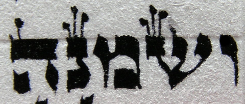
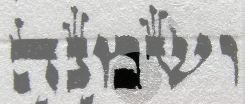
Finally, the letters are very slightly three-dimensional; a human, with stereo vision, can tell the difference between ink and shadow, and a scanner can’t always. Sometimes it’ll interpret a shadow as a crucial fine line, and report a letter kosher when it really isn’t.

So a scan is an excellent tool – I think it’s one of the finer syntheses of technological development and ancient ritual – but it does not replace all the other proofreading tools we use, and it is not a substitute for hard work and knowing your stuff. Few things are, really.


Proofreading, part 20

The other form of computer checking involves much more sophisticated software, and further reduces the chance of human error. In the process we’ve just been talking about, the letters were fed to me automatically, but I still had to use my brain to identify them and see that they were kosher. In this process, there’s barely any brain involved at all.

In this process, the operator uses a hand-held scanner to get the columns of text into the computer. Then it is run through OCR software – very clever software, which not only recognises letter glyphs but can also be taught to handle variations in glyphs caused by its being hand-written. Because it is a computer, it can also be taught some of the laws of whether a letter is kosher or not, so it can apply those mechanically to each glyph and flag up any doubtful cases.

Finally, the OCR output is compared to a Torah text, and any discrepancies are flagged up along with the doubtfully-kosher ones. A report with all problems is generated and given back with the scroll to the sofer, who then goes through the list and fixes everything on it.

Scan report
Scan report

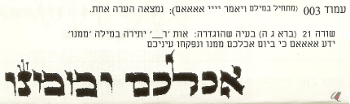
Like this. Column 003, says the first entry on this report, which starts “Vayomer Adonai Elohim” – one comment. Line 21 (Bereshit 3:5), problem, thus: extra letter vav in the word “mimenu,” where it should say “…yodea Elohim ki b’yom akhalkhem mimenu v’nifkedu eineikhem…” and then in the picture you can see it’s got “v’mimenu,” for some reason or other.

I think I probably started writing the mem, got distracted mid-stroke, forgot I’d already started it, and started it over, but I don’t remember now.


Proofreading, part 19

Erm, hem, Part 19 seems to have been exactly the same as Part 18, bit of overenthusiastic copying & pasting there. Normal service will resume tomorrow.


Proofreading, part 18

Another rather pleasing thing about this sort of aural proofreading has to do with the shapes the letters make.

When writing, some letters make very pleasing shapes on the page – the taggin, or how they fit in with the other letters around them, that sort of thing:

TzintzenetTagginAnan

It’s just nice.

And sometimes pleasing three-dimensional shapes as well, although I usually tone those down a bit for the sake of good artisanship:

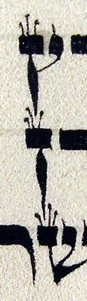
Bumpy ayinBumpy mem

Checking letters by listening, you aren’t so much aware of the letters’ aesthetic value relative to surrounding letters, only their kashrut status, but you do become aware of the shapes they make in sound relative to surrounding letters. I had never thought of the phrase ויבא אביו as having a pleasing shape, for instance, but when the scribomatic read it to me, vav-yud-bet-aleph-beep-aleph-bet-yud-vav, the symmetry there made me very happy. (The scribomatic beeps at spaces.)

Or: alef-tav-beep, hey-alef-tav-tav. Rhythm!

Or יוכבד דדתו לו לאשה – dalet-beep-dalet-dalet, nice, and then vav-beep-lamed, vav-beep-lamed.

Torah writing frequently surprises me with experiences I would never have thought to anticipate, and this was another of them.

Yes, I was proofreading Shemot when I was writing this post.

Not simultaneously, silly.


Proofreading, part 17

A funny thing about checking the letters like this is that you completely lose track of where you are in the Torah.

When you’re writing, you say the words out loud as you’re going along. You’re going very slowly, so you might forget what was happening a few paragraphs before, but you know what’s happening in the part you’re writing.

When you hear the letters coming at you, one after the other, and you’re focusing on them as individual letters and not as words, as a string and not as a text, you don’t have that awareness. At least, I don’t. Try it with a friend and a lump of English sometime, see what you make of it. It’s very interesting, I think – yet another perspective on the Torah text that I wouldn’t have suspected was there.


Proofreading, part 16

There’s still chance for human error though – misspeaking, mishearing, losing the place, saying “hang on a minute” when marking an error and needing to re-establish the place afterwards, going too fast and missing bits, going too slow and wasting time. Plus, it still takes a long time, and paying someone to sit there and read letters is expensive.

This is why I had a friend write me a program which plays the part of the Reader. He called it the scribomatic, which I find vastly pleasing. I have the Torah text in my computer; I copy and paste in the portion of text I want to check, and the scribomatic reads the letters one by one.

Now all I have to do is pick the letter out of the air, not find it in the tikkun, I’m only using a little bit of brain on “Is it there?” and I have lots of brain left over for “Is it kosher?” which means I can assess that more efficiently. When I want the next letter, I press space and the scribomatic reads me the next letter. Pressing space is much quicker than saying “Okay” to the reader and waiting for them to register that and read the next letter.

So the scribomatic uses a computer to do some of the reading and communicating previously done by a human, which reduces the chance of human error. Interacting with the scribomatic is easier and faster than interacting with a human, which makes the process faster. I don’t have to fit into its schedule, and I don’t have to pay it for its time.


Proofreading, part 15

Broadening our scope back into the general activity of proofreading, we left off with me saying that one person checking the Torah by reference to a tikkun isn’t terribly efficient, for several reasons. This is why tradition developed an alternative process, in which a Reader has the tikkun and a Sofer has the klaf. The Reader reads the letters from the tikkun one by one, and the Sofer checks them off.

This greatly reduces the chance of errors caused by misremembering. It also greatly reduces the amount of time spent moving one’s gaze between the klaf and the tikkun, finding and refinding the place, stretching your neck up and down – considered over the length of the entire Torah, this is a considerable saving.

Further, the chance of erring by anticipating – seeing what you think should be there rather than what is there – is reduced, since the text is now being handled as a string of individual letters, rather than as words. To reduce it even further, some people read the text backwards, so it really does become just a string of letters, with no room for anticipation at all.


Proofreading, part 14

Proofreading also picks up on things which are technically kosher and wouldn’t make the reader confused, but just aren’t very pretty.

This stage is a tricky one, because there’s always, always going to be stuff you could have done better, and if you’re not careful you’ll drive yourself into a frenzy of ever more microscopic tweaking, far beyond the point where it could possibly make a difference. Balancing artistic integrity and realism is a skill that has application beyond Torah proofreading, though, so it’s a good skill to learn regardless.

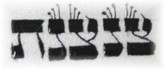
kosher but bleh

Here’s an example. That mem could be prettier.

kosher but bleh

This is a level of detail I think you can only apply to yourself or your student. Applying it to someone else’s writing is just wrong on so many levels – pragmatically idiotic and technically unrealistic, as well as being an exercise in fantastic subjectivity, hyper-criticism, and wishful thinking.

For instance, if you have a Torah that’s getting on in years, some of its letters are not going to be as pretty as they once were. Fact of life. You could spend months going over it and restoring each letter to perfection, but like any invasive cosmetic procedure, there’s only so much that’s going to help; at some point it’s better to accept it as is.

But this is a new Torah and I wrote it, so if I want to make that mem prettier, I will.


Proofreading, part 13

The astute will have worked out by now that this Torah has advanced into the proofreading stage, writing and proofreading happening simultaneously. I just thought I’d mention that.